
Google has updated how nested departments appear on Google Business Profiles, and the change is designed to dramatically improve the user experience, especially for large buildings, campuses, and multi-department businesses.
Below is a breakdown of what changed, why Google made the update, and what it means for your dealership or multi-location brand.
What Changed?
Historically, when a location had multiple nested departments, like Sales, Service, Parts, Oil Change, Collision, etc., Google displayed them directly on the main listing.
OLD VIEW (Before the Update)
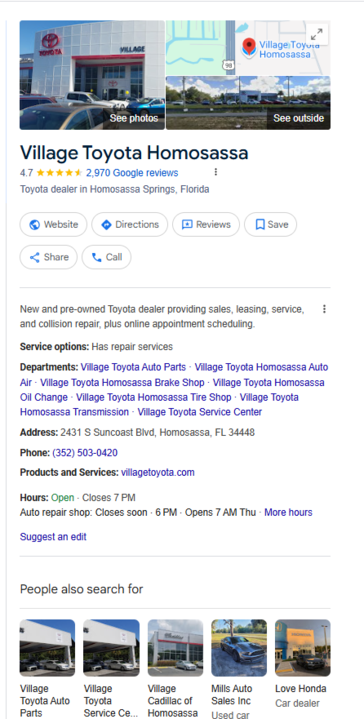
(Example: the main dealership listing visibly showed the Service, Parts, and more departments as departments within the business)
Now, Google has removed this display from the main listing entirely.
Why Google Made This Change
This update wasn’t random. It solves a real user-experience problem.
Large commercial buildings, shopping malls, medical centers, universities, dealerships, and multi-office campuses often have dozens or even hundreds of internal listings. When all of these were displayed directly on the main Google Business Profile, it created:
-
Cluttered profiles
-
Poor navigation experiences
-
Overwhelming lists that didn’t add meaningful value
A Simple Example: Shopping Malls
Think about a major shopping mall with over 150+ businesses inside.
If Google displayed every retailer, kiosk, restaurant, and service provider on the mall’s main listing, the profile would be unusable:
-
Shoppers would have to scroll endlessly
-
Google would have difficulty prioritizing what matters
-
The parent listing would become visually overwhelming
To fix this, Google streamlined the experience.
NEW VIEW (After the Update)
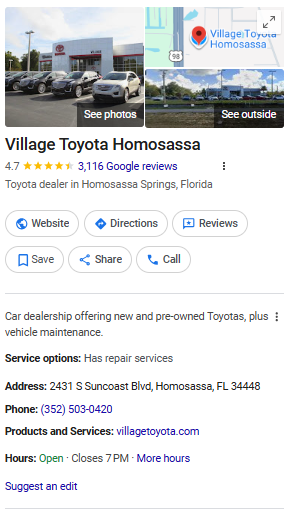
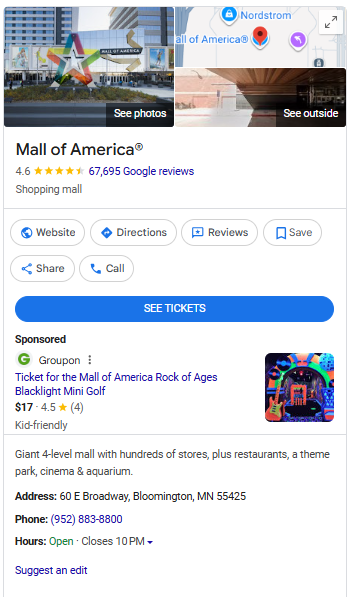
(Example: the main listing no longer shows the department list. Instead, each department listing shows a “Located in: [Main Listing]” tag.)
Department Listings:
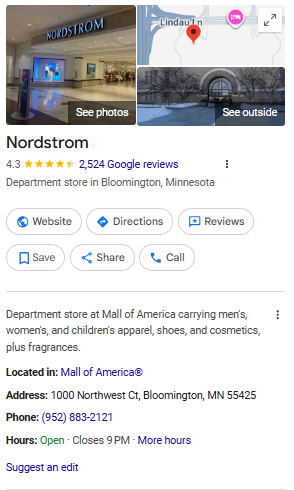
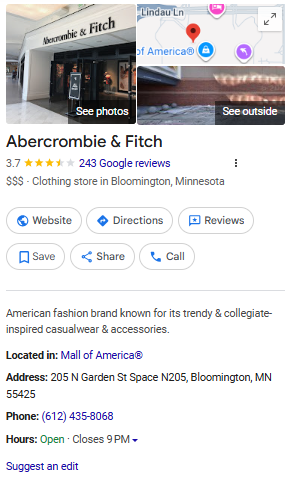
Instead of showing all departments on the parent profile, Google now only shows the department relationship on the department listings themselves.
What This Means for Dealerships
For auto dealers, this change affects how departmental visibility works:
Main Dealership Listing
-
No longer displays the list of nested departments
-
Appears cleaner, simpler, and easier for consumers to navigate
Department Listings (Service, Parts, Collision, etc.)
-
Always show “Located in: [Main Listing]”
-
Maintain clear hierarchical structure
-
Still benefit from proper categorization, optimized data, and increased relevance in search
Even though the department list no longer appears on the main listing, the underlying structure still exists, and Google continues to treat each department correctly in search.
Why Nested Departments Still Matter
Even with the visual change, nested departments continue to provide major benefits:
-
Better targeting for service-specific searches
-
Clean separation of departmental data
-
Improved tracking and analytics
-
Reduced confusion in Google’s systems
-
Less risk of category conflicts or duplicate listing errors
The visual change affects display, not functionality, and the SEO value remains the same: strong.
Need Help Setting Up Nested Departments Correctly?
Our team makes the process fast, seamless, and error-free.
We are a preferred Google partner, and we set these up without suspensions—ever.
We’ve also documented incredible results, including major increases in driving-direction requests after properly nesting and optimizing dealership departments.
➡️ View our case studies to see the impact of proper nested department setup.
➡️ Reach out to our team for quick setup and expert guidance.
Over the past decade, dbaPlatform has supported more than 200,000 locations worldwide. Recently, we’ve observed a potential disconnect between Google’s product and policy teams regarding what is permitted when it comes to nested departments. As a result, there is always a risk of suspended profiles and re-verifications, both with and without nested listings, as we’ve seen play out recently in the automotive industry.